Turn WhatsApp Conversations Into Sales Machines
Manage all your WhatsApp chats in one place. Track leads, automate follow-ups, and close deals faster with AI-powered assistance.
See it before you sign up
Five screens that cover most of a working day.
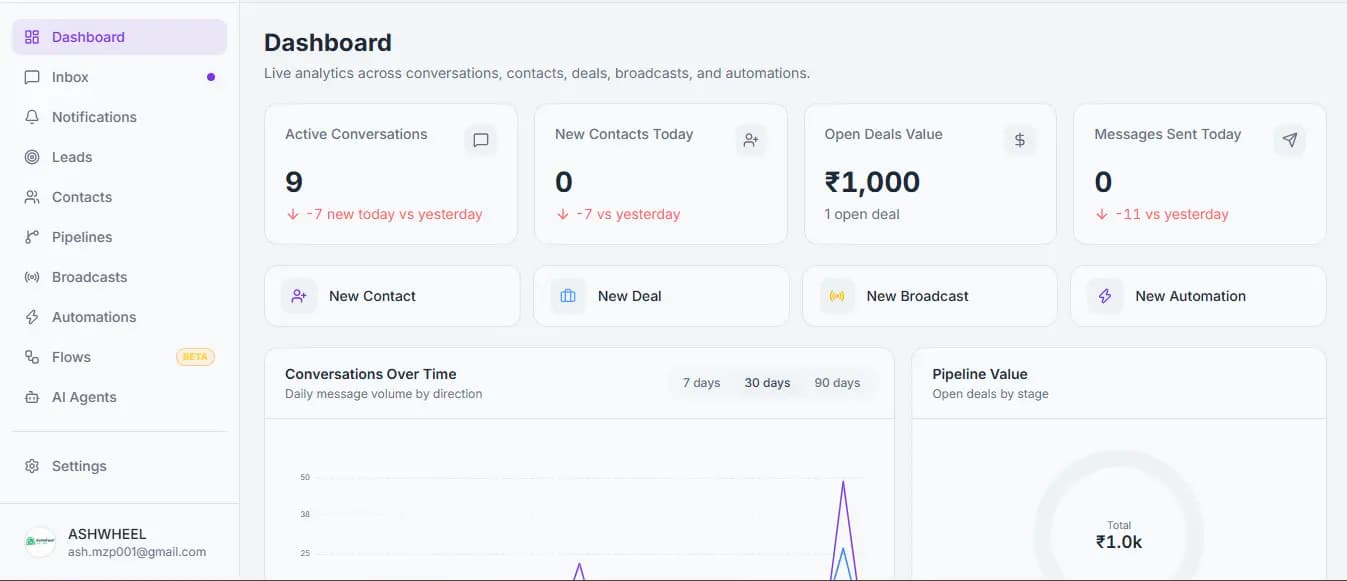
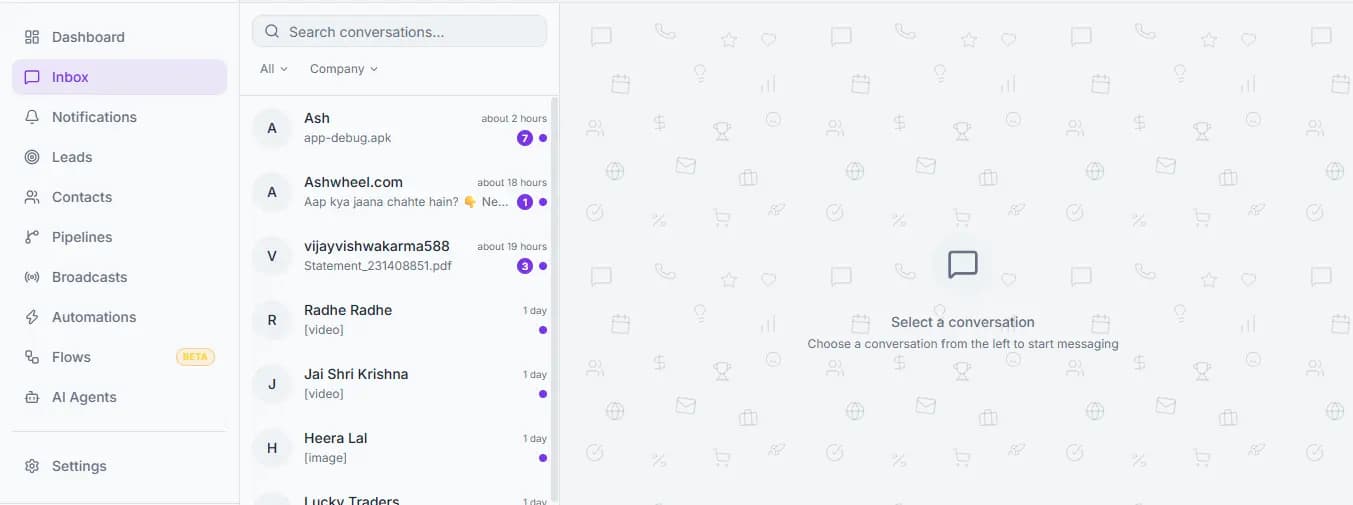
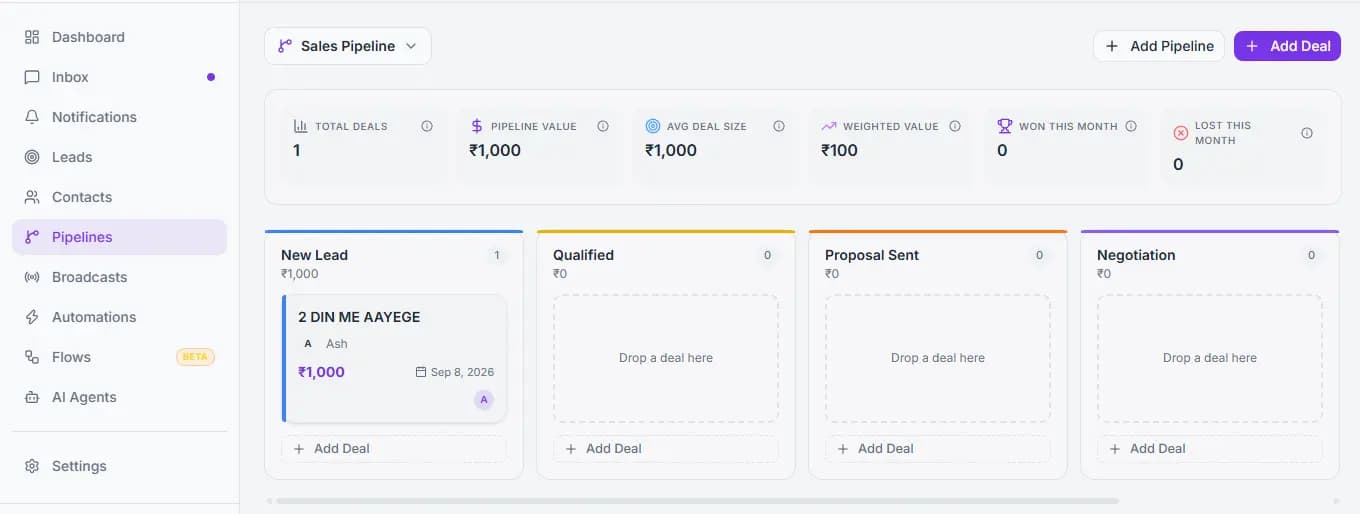
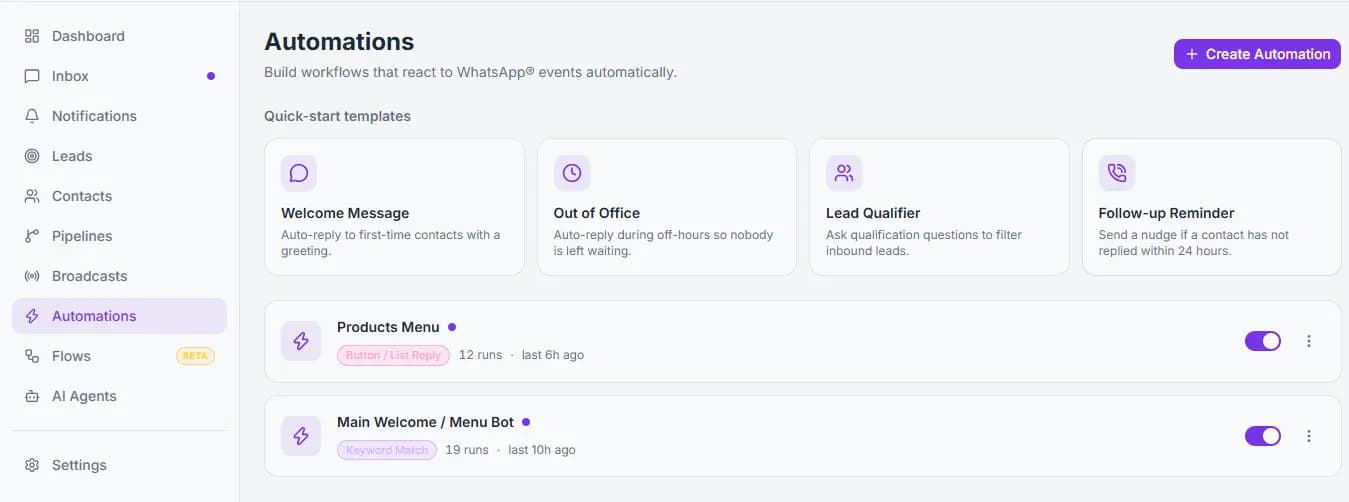
Open conversations, response times and deal value at a glance, for the whole team.
Stop Losing Customers in WhatsApp Chaos
Turn scattered conversations into organized sales opportunities
Without a CRM
Scattered WhatsApp Chats
Messages lost across personal devices and team phones
Missed Leads
Potential customers falling through the cracks
Team Chaos
No visibility on who's handling which conversation
Manual Follow-ups
Spending hours on repetitive tasks and reminders
With Ashwheel CRM
Centralized Inbox
All WhatsApp conversations in one shared workspace
Never Miss a Lead
Track every conversation with pipeline stages
Team Coordination
Assign chats, add notes, and collaborate seamlessly
Automated Workflows
Auto-replies, reminders, and smart routing
Everything Your WhatsApp Team Needs
Powerful features that scale with your business, from solo founders to enterprise teams
Shared WhatsApp Inbox
Team members see all conversations in real-time. No more asking 'Did you reply to that customer?'
Contact Management
Store customer details, tags, custom fields, and full conversation history in one place.
Sales Pipeline
Visual kanban board to track deals from first message to closed sale. Drag, drop, and win.
Broadcast Messages
Send targeted messages to segments. Announce launches, promotions, or updates at scale.
No-Code Automations
Build workflows with triggers, conditions, and actions. Auto-assign, tag, reply, and more.
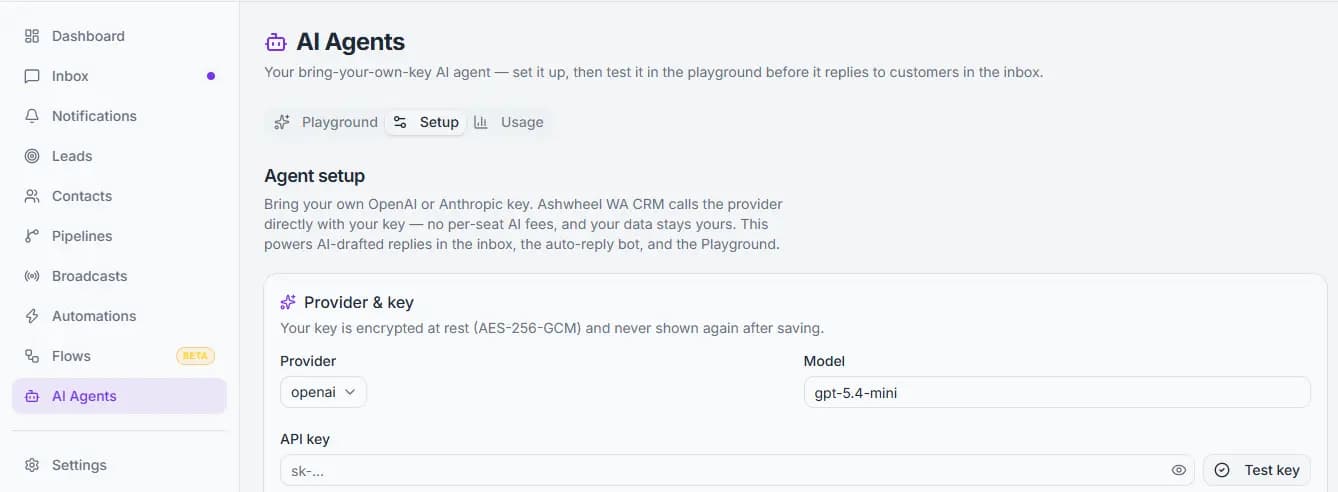
AI Reply Assistant
Get AI-drafted responses based on your knowledge base. Review and send with one click.
Analytics Dashboard
Track response times, conversion rates, team performance, and message volumes.
Team Management
Add team members, set roles and permissions. Control who can access what.
Smart Tagging
Organize contacts and conversations with custom tags. Filter and segment instantly.
Message Scheduling
Schedule broadcasts and follow-ups for the perfect timing. Set it and forget it.
Secure & Private
Self-hosted on your infrastructure. Full control over your data with encryption.
API Access
Integrate with your existing tools via REST API. Build custom workflows.
Automate Repetitive Work
Build powerful workflows without writing a single line of code
Example: Auto-assign and reply to new leads
If no reply in 24 hours → Send reminder → Notify team
Message contains budget → Move to pipeline → Assign closer
"Schedule meeting" → Send calendar link → Add to CRM
Payment received → Welcome series → Training resources
Visual Deal Tracking
See exactly where every deal stands. Drag and drop to update stages. Never lose track of opportunities.
New Lead
Contacted
Qualified
Proposal
Won
Move deals between stages with a simple drag. Instant updates for the team.
Create pipelines that match your sales process. Not locked into defaults.
Attach deal values, see total pipeline worth, forecast revenue.
Reply Faster with AI
Let AI draft responses based on your knowledge base. Review, edit, and send.
Knowledge Base Training
Feed your product info, FAQs, and policies. AI learns your business and suggests accurate responses.
Context-Aware Replies
AI understands conversation history and customer context to generate relevant, personalized replies.
Human Handoff
AI assists, but humans stay in control. Review, edit, and send. Or escalate complex queries to senior team members.
Hi! Thanks for your interest. We offer flexible plans to match your business needs - from small teams to enterprise operations. Each plan includes our shared inbox, automation tools, and AI assistant. Would you like me to walk you through which features would work best for your use case?
Built for Teams
Give every team member the tools they need to succeed. Coordinate seamlessly across your organization.
Roles & Permissions
Admin, Manager, Agent, Viewer roles. Control who can send broadcasts, access contacts, or manage team settings.
Chat Assignment
Manually assign conversations or use automation rules to route chats to the right person automatically.
Smart Notifications
Get notified only about your assigned chats. Mention teammates in notes for quick collaboration.
Activity Tracking
See who's handling what, response times per agent, individual performance metrics for better coaching.
Your Customer Data. Protected.
Enterprise-grade security and reliability built into every aspect of Ashwheel CRM.
Official WhatsApp Business API
Built on the official Meta Business API. No unofficial workarounds or web scraping.
Managed & Secure Deployment
Your CRM environment is configured and maintained for your business. Focus on sales, not infrastructure.
Security & Access Control
Role-based permissions, encrypted credentials, secure API access with proper authentication.
Data Privacy & Compliance
Your customer data is handled with care. We follow industry best practices for data protection and privacy.
Frequently asked questions
The things teams ask before they connect their WhatsApp number.
- What is Ashwheel WA CRM?
- Ashwheel WA CRM is a hosted CRM built on the official WhatsApp Business Platform. It gives a sales or support team one shared inbox for a single WhatsApp Business number, plus contacts, sales pipelines, broadcasts and no-code automations around those conversations.
- Do I need my own WhatsApp Business number?
- Yes. Ashwheel WA CRM connects to your own WhatsApp Business Platform (Cloud API) number from Meta — it does not resell numbers. You keep ownership of the number and of your Meta Business account.
- Is there a free trial, and do I need a card?
- Every new account starts with a 30-day free trial. No payment card is required to start, and you can connect your WhatsApp number and use the full product during the trial.
- What happens to my data when the trial or subscription ends?
- Nothing is deleted. The workspace becomes read-only: sending messages and editing records stop, while every conversation, contact, lead and deal stays visible and exportable. Renewing restores write access immediately.
- Can several agents share one WhatsApp number?
- Yes — that is the main reason teams use Ashwheel WA CRM. Conversations are assigned to individual agents, and an agent sees only the conversations, contacts and leads assigned to them, while owners and admins see the whole account.
- Can I send bulk or promotional WhatsApp messages?
- You can broadcast to a filtered audience, but only using a message template Meta has approved, and only to contacts who have opted in. Meta's WhatsApp Business policies apply in full and unsolicited bulk messaging is not supported.
- Does it use AI, and whose API key does it use?
- Optionally, and yours. You supply your own OpenAI or Anthropic API key. The AI can draft a reply for an agent to approve, or auto-reply with a per-conversation limit and an automatic hand-off to a human. It is off until you enable it.
- Is there an API?
- Yes. Ashwheel WA CRM exposes a versioned REST API at /api/v1, authenticated with scoped API keys you create and revoke yourself, for sending messages and reading contacts and conversations.
- Is Ashwheel WA CRM affiliated with WhatsApp or Meta?
- No. It is an independent product built on Meta's official WhatsApp Business Platform. WhatsApp and Meta are trademarks of Meta Platforms, Inc., and neither endorses nor sponsors this product.
- How do I get pricing or talk to someone?
- Pricing is not published on the site yet — email [email protected] or use the contact form and a person will reply.
Still deciding? Ask us anything or email [email protected].
Your WhatsApp. Your Customers. Your CRM.
Stop losing leads in scattered chats. Start closing deals with organized, automated workflows.